
Download Any Summary – AI‑Powered Document Summarizer, Fast & Secure
Overview of Any Summary
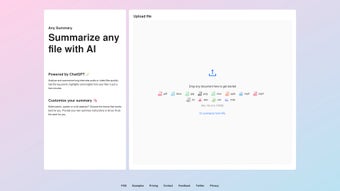
Any Summary is a cutting‑edge AI‑driven summarization tool that transforms lengthy text, audio, and video files into concise, meaningful extracts in seconds. Powered by the latest ChatGPT technology, the application intelligently identifies the most relevant points, highlights, and insights, delivering results that feel both natural and accurate. Whether you’re a researcher sifting through dense academic papers, a journalist needing quick quotes from interview recordings, or a business professional looking to condense lengthy reports, Any Summary offers a flexible, cost‑effective solution.
The platform supports a broad range of file formats—including PDF, DOCX, MP3, MP4, and even direct URLs—up to 100 MB per file, ensuring that virtually any source material can be processed. Users can choose from several output styles, such as bullet‑point lists, quoted excerpts, or full‑length abstracts, and can either let the AI summarize automatically or provide specific instructions to tailor the output. With a clean, intuitive interface and robust privacy safeguards, Any Summary positions itself as the go‑to tool for anyone who regularly deals with large volumes of information and needs to extract value quickly and securely.
Key Features and Benefits
- AI‑Powered Summarization: Utilises OpenAI’s ChatGPT for high‑quality, context‑aware abstracts.
- Multi‑Media Support: Summarizes text documents, audio recordings, and video files from a single interface.
- Custom Output Formats: Choose bullet points, quoted excerpts, or full abstracts to match your workflow.
- File Size Flexibility: Handles files up to 100 MB, including direct URL imports for web‑based content.
- Automatic vs. Guided Summaries: Let the AI decide or provide specific instructions for targeted results.
- Cross‑Platform Accessibility: Available on Windows, macOS, Android, and iOS with seamless cloud sync.
- Privacy‑First Design: All processing occurs on encrypted servers; no data is stored beyond the session unless you opt‑in.
- Cost‑Effective Pricing: Free tier for basic usage and affordable premium plans for heavy users.
Pros
- Rapid processing – most summaries are generated in under a minute.
- Highly accurate AI output that retains the original meaning.
- Intuitive UI that requires no technical expertise.
- Flexible output options for diverse professional needs.
- Strong security measures protect user data.
Cons
- Free tier limits the number of summarizations per day.
- Large video files close to the 100 MB limit may take slightly longer.
- Advanced customization (e.g., tone control) is only available in premium plans.
Installation, Usage Guide & System Compatibility
Step‑by‑Step Installation
Getting started with Any Summary is straightforward. For desktop users, visit the official website and click the “Download for Windows” or “Download for macOS” button. The installer is a lightweight .exe or .dmg file that guides you through a typical installation wizard—accept the license agreement, choose an installation folder, and click “Install.” Mobile users can find Any Summary in the Google Play Store or Apple App Store; simply tap “Install” and the app will appear on your home screen. All versions support automatic updates, ensuring you always have the latest AI models and security patches without manual intervention.
How to Summarize Your Content
Once installed, launch the application and you’ll be greeted by a clean dashboard. Click “Add File” to upload a document, audio clip, or video, or paste a URL to summarize web content directly. After the file loads (progress bars show upload status), choose your preferred output style: bullet points for quick scans, quoted excerpts for journalism, or a full abstract for academic work.
For custom summarizations, select “Advanced Options” and type specific instructions—for example, “Focus on methodology and results” or “Highlight only direct quotes.” Press “Summarize” and the AI begins processing. Within seconds, a concise summary appears in the right‑hand pane, ready for copy‑paste or export as a .txt or .pdf file. The app also offers a “History” tab where you can revisit past summaries, making it easy to manage large projects.
Supported Operating Systems
Any Summary runs natively on Windows 10 and later, macOS 11 (Big Sur) and later, as well as on Android 8.0+ and iOS 13+. The cloud‑based processing means that even low‑spec devices can handle large files, as the heavy AI workload is performed on secure remote servers. System requirements are modest: a minimum of 2 GB RAM, 200 MB of free disk space for the app, and an internet connection for AI calls.
Frequently Asked Questions & Final Thoughts
Is Any Summary free to use?
Yes, Any Summary offers a free tier that allows up to 5 summarizations per day with basic output options. Premium plans unlock unlimited usage, advanced customization, and priority processing.
Can I summarize video content directly?
Absolutely. Any Summary supports MP4, MOV, and other common video formats up to 100 MB. The AI extracts audio, transcribes speech, and then creates a concise written summary.
How does Any Summary protect my data?
All uploads are encrypted in transit with TLS 1.3. The service processes files on secure servers and automatically deletes them after the summarization session unless you enable cloud storage for later retrieval.
What file formats are supported?
Any Summary accepts PDF, DOCX, TXT, MD for text; MP3, WAV, AAC for audio; MP4, MOV, AVI for video; and also allows direct URL summarization for web pages and online articles.
Is there a limit to the length of the summary?
You can set a target length in the “Advanced Options” – ranging from a single sentence up to a full-page abstract. The AI respects the limit while preserving key information.
Conclusion – Why You Should Download Any Summary Today
In a world where information overload is the norm, Any Summary stands out as a reliable, secure, and affordable companion for anyone who needs to distill knowledge quickly. Its AI backbone delivers consistently high‑quality summaries across text, audio, and video, while the flexible output options let you adapt the results to your specific workflow. With seamless installation on Windows, macOS, Android, and iOS, plus robust privacy safeguards, the tool integrates smoothly into both personal and professional environments. Whether you’re a student battling research papers, a journalist chasing interview highlights, or a manager turning meeting recordings into actionable minutes, Any Summary saves time and boosts productivity. Don’t let lengthy documents slow you down—download Any Summary now, experience the power of AI summarization, and stay ahead of the information curve.






